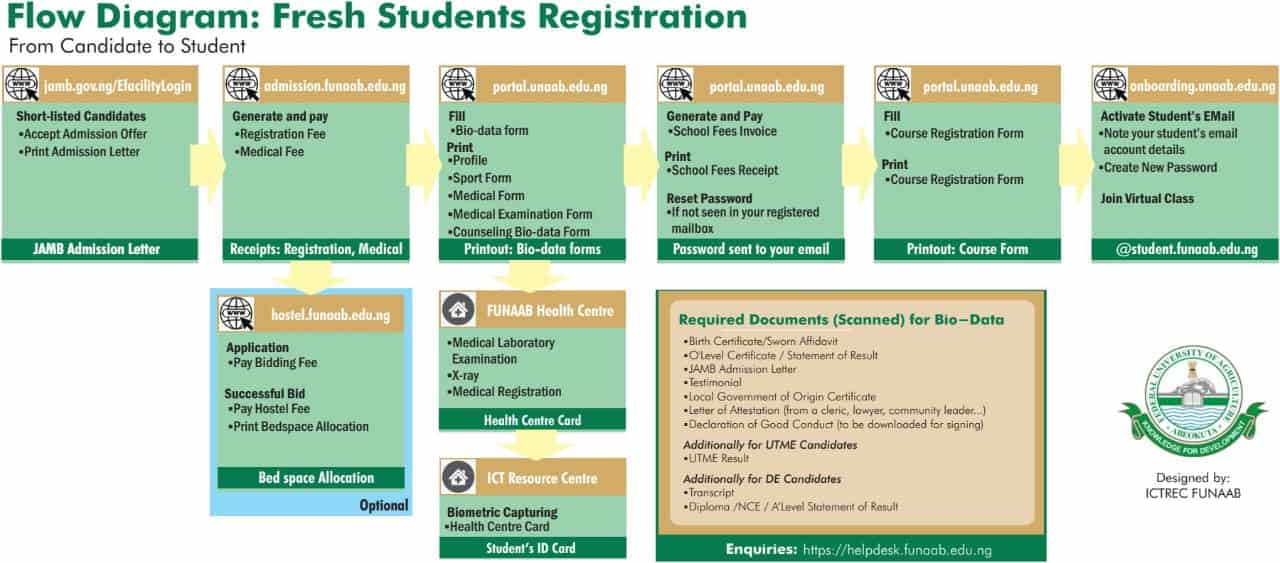
The Federal University of Agriculture, Abeokuta (FUNAAB) has released the registration procedure for fresh students of the 2024/2025 academic session.
This guide will take you through each step, ensuring you complete your registration smoothly.
FUNAAB Fresh Students Registration Procedure
Step 1: JAMB Admission
- Website: JAMB Efacility Login
- Actions:
- Short-listed candidates must accept their admission offer.
- Print your JAMB Admission Letter.
- Outcome: You will have your JAMB Admission Letter.
Step 2: Registration and Medical Fees
- Website: FUNAAB Admission Portal
- Actions:
- Generate your Registration Fee and Medical Fee.
- Make the necessary payments.
- Outcome: You will receive receipts for both Registration and Medical.
Step 3: Bio-Data Forms
- Website: FUNAAB Portal
- Actions:
- Complete the Bio-data Form.
- Print the following:
- Profile Form
- Sport Form
- Medical Form
- Medical Examination Form
- Counseling Bio-data Form
- Outcome: You will have printed copies of the required forms.
Step 4: School Fees Payment
- Website: FUNAAB Portal
- Actions:
- Generate the School Fees Invoice.
- Pay the required fees.
- Print the School Fees Receipt.
- Reset your password if needed.
- Outcome: A password will be sent to your email for further access.
Step 5: Course Registration
- Website: FUNAAB Portal
- Actions:
- Complete the Course Registration Form.
- Print your Course Registration Form.
- Outcome: You will have the course form ready for use.
Step 6: Student Email Activation
- Website: FUNAAB Onboarding Portal
- Actions:
- Activate your student email account.
- Note down your new email account details.
- Create a new password.
- Join your virtual class.
- Outcome: Your @student.unaab.edu.ng email will be activated.
Step 7: Bed Space Allocation (Optional)
- Website: FUNAAB Hostel Portal
- Actions:
- Apply by paying the bidding fee.
- If successful, pay the hostel fee.
- Print your bedspace allocation.
- Outcome: You will receive your Bed Space Allocation (if needed).
Step 8: Health Centre Registration
- Location: FUNAAB Health Centre
- Actions:
- Undergo a Medical Laboratory Examination.
- Complete the X-ray and other necessary medical registrations.
- Outcome: You will receive your Health Centre Card.
Step 9: Student ID Card
- Location: FUNAAB ICT Resource Centre
- Actions:
- Complete biometric capturing.
- Present your Health Centre Card.
- Outcome: You will receive your Student ID Card.
Required Documents for Bio-Data
- Birth Certificate or Sworn Affidavit
- O'Level Certificate or Statement of Result
- JAMB Admission Letter
- Testimonial
- Local Government of Origin Certificate
- Letter of Attestation (from a cleric, lawyer, community leader, etc.)
- Declaration of Good Conduct (to be downloaded for signing)
Additional Documents for UTME Candidates
Additional Documents for Direct Entry (DE) Candidates
- Transcript
- Diploma or NCE/A'Level Statement of Result
For further assistance, visit the FUNAAB Helpdesk.