JAMB CBT App 2026: Offline Android & iOS UTME Practice
Download MySchoolGist JAMB CBT App for 2026 UTME Practice
Download the MySchoolGist JAMB CBT Practice App for Android, iPhone or Windows and prepare for the 2026 UTME with offline practice, past questions and answers, detailed explanations and performance tracking.
- Android App Download on Google Play Fast access for Android phones and tablets Opens in a new tab
- iPhone & iPad App Download on the App Store Practice on iOS devices anywhere Opens in a new tab
- Windows Software Get the Windows Version Ideal for desktop and laptop practice Opens in a new tab
Why students use the MySchoolGist JAMB CBT Practice App
The MySchoolGist JAMB CBT App, mobile UTME practice tool for 2026 UTME candidates.
- It is for Android, iPhone and iPad.
- It has 30,000+ past JAMB questions and answers.
- UTME syllabus and explanations are inside.
- It is usable offline after setup.
- Shows scores, strengths and weak areas
Read on for how the JAMB CBT App supports daily UTME practice.
Contact MySchoolGist
- Email: admin@myschoolgist.com
- Phone: 0915 526 9270
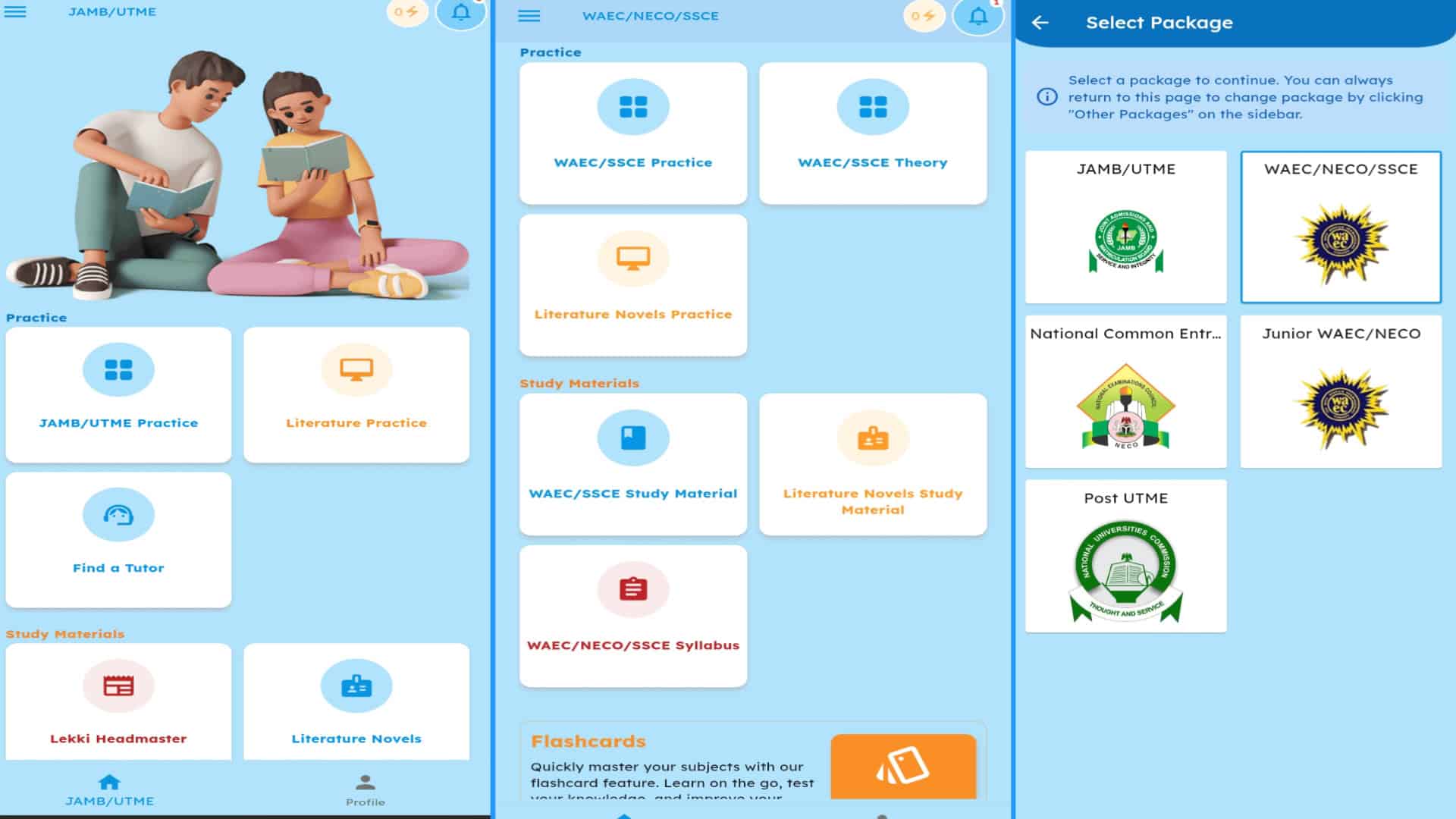
Are you preparing for the 2026 UTME and want a tool that will help you scale through without hurdles? If yes, MySchoolGist's JAMB CBT App is there for you.
MySchoolGist's JAMB CBT App is a mobile practice tool designed for candidates preparing for the 2026 UTME. It is available for Android and iOS devices, including iPhone and iPad.
The app has been built for candidates who need regular practice with past questions, syllabus-based topics and UTME-style controls.
What Is the MySchoolGist JAMB CBT App?
The MySchoolGist JAMB CBT App is a mobile practice tool for UTME candidates.
MySchoolGist first built the practice tool for desktop users before rebuilding it for phones and tablets, since many candidates may not have easy access to a computer. A phone is often the device within reach during the day; short practice can become part of ordinary study time.
Who Is the JAMB CBT App For?
The app is for candidates preparing for the 2026 JAMB UTME.
It will be useful for candidates who need past JAMB questions, subject explanations, syllabus checks, Literature-in-English set text support and offline practice after setup. A learner may use it for ten minutes during a break or for a full four-subject practice session when time allows.
What Does the JAMB CBT App Include?
The app contains study features that match common UTME preparation needs.
Candidates can use the app for topic drills, full practice sessions and revision checks. Each feature is tied to preparation rather than guesswork.
How Do the 30,000+ Past JAMB Questions Help Candidates?
The app includes over 30,000 past JAMB questions across subjects.
Each question comes with an explanation, so the candidate can learn why an option is correct instead of memorising only the answer letter. A Government question, for example, may point back to the rule or idea being tested; that same idea may appear again in another year.
Is the UTME Syllabus Available Inside the App?
The full UTME syllabus is available inside the app.
Candidates can use the syllabus to check topics already covered and topics left within each subject. MySchoolGist also provides the same syllabus online through the UTME syllabus for all subjects.
Can the JAMB CBT App Work Offline?
The app can run without a network connection after setup.
This supports candidates with poor signal at home and candidates who spend time on the road. Practice can continue during a bus ride, during a break or during any period with no service.
Does the App Look Like the Real UTME Screen?
The app has a UTME-style layout and controls.
Since UTME is a computer-based test, the app's layout helps candidates become familiar with the exam style before the test day. It includes the eight-key system used during UTME:
- A
- B
- C
- D
- P
- N
- S
- R
First-time candidates may lose time when they are unsure about exam controls. Regular practice can reduce screen confusion and keep attention on the questions.
Does the App Cover Literature Set Texts?
The app includes Literature-in-English set text support.
"The Lekki Headmaster" is covered chapter by chapter, with questions for practice. Candidates may also study the The Lekki Headmaster questions and answers for guided revision.
Other set texts also have summaries and explanations within the app.
What Practice Options Are Available?
The app supports different study patterns.
Candidates may choose topic-focused practice when they need repeated drills on a weak area. They may also take full sessions across four subjects for a UTME-style run.
At the end of a full session, the app provides a score out of 400, in line with UTME scoring. One candidate may repeat Algebra sets, while another may prefer complete subject sessions; both patterns are supported.
How Can Candidates Use Session Results?
After each session, the app shows results that point to strong areas and weak areas.
It also provides key points from each subject for revision. A repeated low score in one topic may show where the next practice session should be focused; a rising score may show a subject that still needs light revision to keep coverage steady.
Is There a JAMB-Style Calculator?
The app includes a JAMB-style calculator.
This supports practice for Mathematics, Physics and other subjects that require calculations. Regular use can make the calculator layout more familiar before the exam.
How Can Candidates Study With the App?
A simple study plan can help candidates keep practice steady.
The app can be used for short sessions, full subject runs or topic-based revision. Ten to twenty minutes may be enough for one focused session.
Common study patterns include:
- One subject focus: answer questions, read explanations and repeat the topic.
- Subject rotation: practise English on one day and Biology on another.
- Short daily blocks: complete one or two subjects when time allows.
- Four-subject sessions: use the 400-score result as a checkpoint.
Some days may produce lower scores. The better response is to check the weak area and practise again.
How Should the Syllabus Guide Revision?
The syllabus can work as the topic list for each subject.
A candidate can select a topic from the syllabus, practise questions on that topic and review the explanations after each set. The session result can then guide the next topic for revision.
This method keeps study tied to UTME coverage. It also helps candidates avoid random practice that leaves some topics untouched.
How Does Offline Practice Help Busy Candidates?
Offline practice can be useful on days with travel, poor network service or limited data access.
Candidates can answer question sets while waiting in a queue, during a ride or at night when internet service is slow. The app allows practice to continue after setup without repeated data requests.
What Should Candidates Know About Fair Preparation?
MySchoolGist is not JAMB.
The app content is based on past questions and the UTME syllabus. It does not offer leaked papers and it is meant for candidates who want fair preparation through repeated practice.
How Can Candidates Get Started?
The app is a downloadable product, so practice can start after installation and setup.
After setup, candidates can study at home or while moving, with or without network service, based on their schedule. To begin, use the Download MySchoolGist UTME Practice App section and start practising.