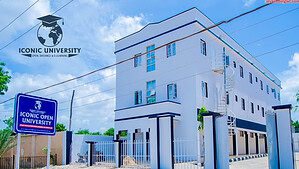
Iconic Open University, based in Sokoto, has opened its portal for new students. If you meet the basic requirements, you can apply for any of the listed courses under either UTME or Direct Entry.
Courses Available
Here's the full list of programmes you can apply for:
- B.N.Sc Nursing Science
- B.Sc. Public Health
- B.Sc. Health Information Management
- B.Sc. Computer & Information Technology
- B.Sc. Software Engineering
- B.Sc. Islamic Studies
- B.Sc. Accounting
- B.Sc. Business Administration
- B.Sc. Public Administration
- B.Sc. International Relations & Diplomacy
- B.Sc. Criminology & Security Studies
- B.Sc. Mass Communication
How to Apply
Step 1: Start the Process
Go to the Iconic University homepage.
Click "Apply Now" at the top of the page.
Fill out the online application form. Make sure to accept the terms and conditions.
After submission, check your email. Click the confirmation link to activate your account.
Or go directly to the application portal if you're ready.
Step 2: Make Payment & Upload Documents
Once your email is confirmed, pay the application fee. You can use any debit or credit card.
After payment, continue the application. Upload a clear passport photo and your documents in one PDF file.
Choose your programme type (Certificate, Diploma or Degree).
Pick your semester (Fall or Spring).
Direct Entry applicants should select their level and check admission subject requirements using "View Admission Requirement."
Step 3: Admission Review
The registrar will review your application. This may take a few days.
Watch your email closely.
Once admitted, you'll receive a confirmation email.
Log in to your account.
Download your admission letter.
Pay your tuition fee using the payment link sent.
Once payment is done, you can register your courses. That's your green light to begin classes.
Step 4: Submit Physical Documents
This step isn't urgent but must be completed in your first year.
Send all required certificates to the university either by post or in person.
Attestation is compulsory before you can graduate.
Send notarised copies of your documents. These must carry valid stamps and signatures.
Photocopies of these notarised documents are accepted.
Where to Reach Them
Campus Office:
No. 1B Gusau Road, After Government House Roundabout, PMB 02121, Sokoto, Nigeria
Email: info@iconicuniversity.edu.ng
Phone: +2348142829382