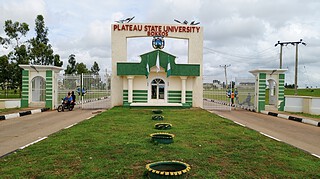
Plateau State University, Bokkos has announced an online Post UTME and Direct Entry screening exercise for candidates seeking undergraduate admission during the 2026/2027 academic session.
The exercise covers candidates who applied through the 2026 JAMB UTME or Direct Entry process and selected PLASU as their first choice. Online screening will commence on Wednesday, 15 July 2026.
Applicants should check the cut-off mark for their chosen programme before paying the prescribed screening fee, as some courses require scores above the general minimum of 160.
When will PLASU screening registration begin?
Registration will open on Tuesday, 14 July 2026.
The online screening exercise will commence on Wednesday, 15 July 2026, while registration will close on Sunday, 20 September 2026.
Candidates should complete payment, file uploads and final submission within this period.
Who is eligible for the PLASU Post UTME screening?
The Post UTME screening is open to candidates who:
- Selected Plateau State University, Bokkos as their first choice
- Scored at least 160 in the 2026 JAMB UTME
- Meet the cut-off mark assigned to their chosen programme
- Have uploaded their O'Level results to JAMB CAPS
- Will pay the prescribed screening fee and complete the online form
Candidates seeking Law, Medicine and Surgery, Nursing, Pharmacy or Medical Laboratory Science must meet the higher score assigned to the programme.
What are the PLASU cut-off marks for 2026/2027?
The minimum acceptable JAMB UTME scores are listed below.
| Programme | Minimum UTME score |
|---|---|
| Law | 200 |
| Medicine and Surgery | 200 |
| Nursing | 200 |
| Pharmacy | 190 |
| Medical Laboratory Science | 190 |
| All other programmes | 160 |
A score of 160 qualifies a candidate for the general screening process, subject to the score required by the selected department.
Applicants should confirm their programme requirement before completing the PLASU form.
Who is eligible for PLASU Direct Entry screening?
Direct Entry applicants must have selected Plateau State University, Bokkos as their first choice during the 2026 JAMB Direct Entry application.
They must also possess at least one of the following qualifications:
- A first degree
- Higher National Diploma
- National Diploma with at least Lower Credit
- Nigerian Certificate of Education with at least a Merit grade
- IJMB or JUPEB with at least 6 points
The applicant must also meet the admission requirements attached to the preferred programme.
Can candidates who selected another university apply?
Only candidates whose first choice is Plateau State University, Bokkos are eligible for the screening.
A candidate who selected another school may change the first choice to PLASU through the JAMB portal before completing the university screening form.
Candidates who also wish to move to another course should complete the course change on the JAMB portal before starting PLASU registration.
Which new courses are available at PLASU?
Candidates who wish to study any of the newly listed programmes may complete a change of course on the JAMB portal before undertaking the Post UTME screening.
Faculty of Computing
- B.Sc. Cyber Security
- B.Sc. Data Science
Faculty of Education
- B.Sc.Ed. Economics Education
- B.Ed. Education Management
- B.Ed. Guidance and Counselling
- B.Ed. Early Child Education
- B.Sc.Ed. Social Studies and Civic Education
Faculty of Environmental Sciences
- B.Sc. Quantity Survey
Faculty of Mass Communication
- B.Sc. Broadcasting
- B.Sc. Development and Communication Studies
- B.Sc. Journalism and Media Studies
- B.Sc. Strategic Communication
Faculty of Medical Sciences
- D.PT. Physiotherapy
- B.Sc. Nutrition and Dietetics
- O.D. Optometry
- B.Rad. Radiography
Candidates choosing any of these courses should ensure that the programme shown on the JAMB portal matches the programme entered during PLASU screening registration.
What is required before registration?
An applicant should have the following details and files ready before opening the screening portal:
- JAMB registration number
- Active phone number
- Valid email address
- Recent passport photograph
- Scanned signature
- O'Level result details
- Result verification scratch card details
- Certificate or Letter of Indigene
- Birth Certificate or Declaration of Age
The passport photograph and signature must each be no more than 150 KB. Accepted formats are JPG, JPEG and PNG.
How can candidates register for PLASU Post UTME?
Registration will be completed through the university's online screening portal.
- Visit the PLASU Post UTME and Direct Entry screening portal.
- Select "New Applicant – Apply Here".
- Enter the JAMB registration number.
- Complete the registration form with an active phone number and valid email address.
- Create a password, select the mode of entry and choose the preferred programme.
- Select "Register".
- Check the registered email address for a verification link.
- Open the verification message and select the link to activate the account.
- Return to the portal and sign in.
- Select "Make Payment" to generate a Remita Retrieval Reference.
- Pay the prescribed screening fee through any available payment channel.
- Upload a recent passport photograph and signature.
- Enter the O'Level results, using no more than two sittings.
- Begin the O'Level entry with the five relevant subjects required for the chosen programme.
- Enter valid scratch card details for online result verification.
- Complete the personal information section.
- Provide the requested parent or guardian details.
- Enter the next-of-kin information and contact address.
- Upload the O'Level result, Certificate or Letter of Indigene and Birth Certificate or Declaration of Age.
- Review every entry and uploaded file.
- Accept the declaration that the supplied information is true.
- Submit the completed application.
- Print the Application Slip, University Receipt, Remita Receipt and Screening Summary.
Candidates should retain all four printouts for admission records and any later verification.
How should O'Level results be entered?
Candidates may use a maximum of two O'Level sittings.
The first five subjects entered should be the subjects required for the chosen programme. Valid scratch card information must also be supplied for online verification of the result.
Applicants must upload their O'Level results to JAMB CAPS, as entering the result on the PLASU portal does not replace the JAMB upload requirement.
An accredited JAMB CBT centre may be used for the CAPS upload.
What files must be uploaded?
Each applicant will be required to upload:
- A recent passport photograph
- A scanned signature
- O'Level result
- Certificate or Letter of Indigene
- Birth Certificate or Declaration of Age
The passport photograph and signature must each be 150 KB or less and saved as JPG, JPEG or PNG.
Candidates should use clear files with readable details. Incorrect, false or forged records will lead to disqualification.
What should candidates print after submission?
Successful applicants should print the following records after submitting the form:
- Application Slip
- University Receipt
- Remita Receipt
- Screening Summary
Printing these records confirms that the main registration stages have been completed. Candidates should check that their personal details, programme and JAMB registration number are correct on the printouts.
What happens after admission is offered?
A candidate who receives an admission offer must accept it on JAMB CAPS within two weeks.
Failure to complete the CAPS acceptance within the stated period may affect the admission process.
The university may verify every qualification and supporting record submitted during the screening exercise.
Where can candidates receive technical support?
Applicants experiencing difficulty with registration may visit either of the following support offices:
PLASU ICT Directorate
ICT Directorate
Plateau State University
Bokkos
Extended ICT Support Office
ICT Directorate Extended Support Office
Obasanjo Model School
Beside NITEL Office, Jos
Adjacent to Plateau State Polytechnic Jos Campus
Jos
Applicants seeking technical help should take their JAMB registration number and any available payment or registration record to the support office.
How can applicants avoid admission fraud?
Candidates and members of the public should be careful of people claiming to be university admission agents.
Admission into Plateau State University is handled directly by the university and JAMB. No third party or agent has been authorised to offer admission on behalf of PLASU.
Applicants should use the official screening portal and JAMB channels for registration, course changes, admission checks and CAPS acceptance.
False information or forged documents will result in disqualification.